- Firm Time - Time must be exactly strictly maintained(Airbag)
- Soft time -Calculator
Dependant on
Time driven
Event driven
In typical designs, a task has three states:
Running (executing on the CPU);
Ready (ready to be executed);
Blocked (waiting for an event, I/O for example)
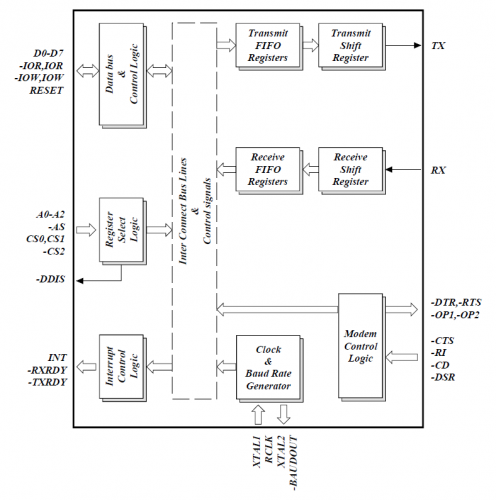
ESP32
ESP32 Circuit Diagram
Using the different architectures and instruction sets in ESP32 and the use of RTOS on it.
We usually use Amazon's free RTOS but there are other alternatives like mongoos (FOSS) and QNX (Proprietary). Each OS has inherently different advantages.
My journey of migrating to Ubuntu Desktop from elementaryOS
Introduction
After 6 months of using Elementary OS as my main operating system, found the little bugs and issues as big inconveniences as I was wasting time trying to fix them. So I bit the bullet and chose to install Ubuntu 22.04 LTS. Here is my experiences
Issues from ElementaryOS
ElementaryOS is a wonderfully made Linux distro with beautiful UI (Pantheon) which makes it an easy selection for a ex-Mac user. Beautifully crafted curated apps, and gesture based operation makes work on it wonderful. But I met some bugs that broke my interests.
Not able to extract files quicky
Lack of windows gestures or comlicated
Dark mode not working properly
Default apps not working as configured
AMD graphics driver issues
Windows tilling doesnt work properly.
So I came to the conclusion of Switching into Ubuntu ,
Why Ubuntu?
Ubuntu as an OS has many qualities I am looking forward to:
Stability: Ubuntu is known for its stability and long-term support (LTS) releases, which means fewer bugs and more reliable performance.
Community Support: Ubuntu has a large and active community, making it easier to find solutions to any issues that may arise.
Software Availability: Ubuntu has a vast repository of software packages, making it easy to find and install the tools I need.
Customization: Ubuntu offers a high level of customization, allowing me to tailor the desktop environment to my preferences.
Performance: Ubuntu is optimized for performance, ensuring smooth and efficient operation even on older hardware.
Installation Process
The installation process of Ubuntu 22.04 LTS was straightforward and user-friendly. Here are the steps I followed:
Download the ISO: I downloaded the Ubuntu 22.04 LTS ISO from the official Ubuntu website.
Create a Bootable USB: Using a tool like Rufus, I created a bootable USB drive with the downloaded ISO.
Boot from USB: I restarted my computer and booted from the USB drive.
Install Ubuntu: I followed the on-screen instructions to install Ubuntu, choosing the appropriate options for my setup.
Post-Installation Setup: After installation, I updated the system and installed the necessary drivers and software.
Post-Migration Experience
After migrating to Ubuntu, I noticed several improvements:
Smooth Performance: Ubuntu runs smoothly without the glitches I experienced on ElementaryOS.
Better Hardware Support: My AMD graphics card works perfectly with the proprietary drivers available in Ubuntu.
Enhanced Productivity: The availability of a wide range of software and tools has enhanced my productivity.
Improved Customization: I was able to customize the desktop environment to suit my workflow and preferences.
Conclusion
Migrating to Ubuntu 22.04 LTS has been a positive experience overall. The stability, community support, software availability, and customization options make it a great choice for my needs. While ElementaryOS has its charm, Ubuntu provides the reliability and performance I require for my daily tasks.
Day 1: Computational Thinking
Computational thinking
1. Decomposition: Breaking down bigger problem to smaller ones
2. Pattern recognition : finding similar prolems and applying already solved questions
3. Abstraction: Identify the root cause and remove other factors
4. Algorithm design: We come out with step by step processes to solve the problem.
Psedo code
Flowcharts
Blaise Pascal invented the first mechanical calculating machine,
John Von Nuemann: Modern Computer
Day 2: software anatomy
1.UI (User interface)- Client/ Front-end : Contains the Presentation logic(C,C++,HTML, CSS, JavaScript, Node, etc. If it is a mobile app, technologies such as Ionic, Swift, or Kotlin )
2.Database: Stores the data(MySQL)
3. Server- Backend: The end( PHP, Ruby, Python, and Go)
Day3: Programming
Programming is the set of instructions given to a computer to follow using a language it understands
Python uses interpreter
Day 4: Python basics
+ Addition
- Subtraction
* Multiplication
/ Division
** Power
% Remainder
Power of precedence
Parenthesis
Power
Multiplication
Addition
Left to Right
Day 5:Bit more
Complex = 5+10j
1.is operator and id() can be used to find the memory address
2.type() for the variable type
3.value for the value in the variable
Mutability : value can change( list, set, dict )
Immutable : value cannot change ( int, float, bool, str, tuple )
Day 6:Seperator
>>print(1,2,3,4, sep='-')
1-2-3-4
>>print(1,2,3,4, sep='*', end='#')
1*2*3*4#
Day7: Functions
A function is a block of organized ,reusable code used for a single related action.
Gives
Better Modularity
High degree of code reuse
Built in:
print(), min(), max()
Made up:
what ever you want
Syntax
def functionname():
fucntionstuff
return
#((indentation required))
Docstrings
The Docstrings are supposed to provide detailed documentation for a function. It can be composed of the function’s purpose, its list of arguments, its return values and any other information that the programmer thinks important to mention.
A docstring is added as the first statement in the body of a Python function. These need to be within quotation marks and the recommended convention to use the triple-quotes (in double quotes) as “”” docstring “”” . These can be on a single line or be multi lined as well. If the docstring fits on a single line both the opening and closing quotes should be on the same line.
We can also view the docstrings of built-in and user defined functions using the __doc___ attribute.
def calc(quantity, price):
"""Returns the product of quantity and price"""
return quantity*price
print (calc.__doc__)
Returns the prodcut of quantity and price
>>>
Day8: Errors
1. Syntax errors
2. Runtime errors
NameError,IndexError,TypeError,ValueError,ImportError
3. Logical errors
Try/Except : Just like in VB in SLIR
Day 9 : Files
open files using open() function
-Gives a file handle which gives file operations like read,write
example:
fhandle = open("myfile.txt","r")
We can use the read function too if you want to (read())






.jpeg)


